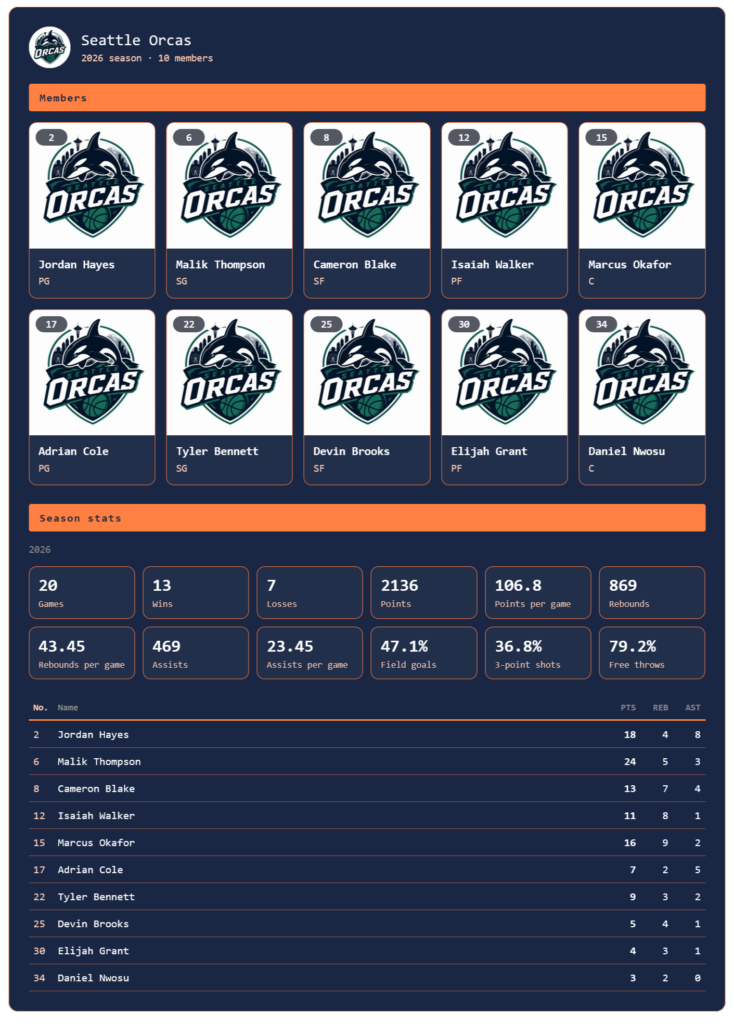
SPOSCOR Soccer 3.3.0 and SPOSCOR Basketball 1.12.0 add season stats to team management in the Pro plan. Paste the season figures you keep in a spreadsheet, and they appear on the team’s roster page.
Download:
- https://wordpress.org/plugins/sposcor-soccer/
- https://wordpress.org/plugins/sposcor-basketball/
If you already use the plugin, update it from the Plugins screen in your admin. Existing teams and matches carry over unchanged.
Paste it on the team screen
The team editor has a new Season stats box with three parts.
As of. Write whatever fits — “As of 21 November”, “After round 5”. It’s shown above the stats exactly as written, so visitors know how recent the numbers are.
Team stats. One item per line: the name, then the value.
Wins	6
Draws	2
Losses	2
Goals for	21
Goals against	9
For basketball, add points per game, rebounds per game or whatever else you track.
Player stats. Column names on the first line, then one player per line.
No.	Name	GP	G	A
9	Kenta Mori	10	8	3
10	Shun Aoki	10	4	6
The columns are up to you, and players are shown in the order you paste them — sort by goals, by number or any other way in your spreadsheet, and the page follows. Because more players take part over a season, up to 60 can be listed.
As soon as you paste, a preview of what was read appears, so you can check the format before you save.
Where they appear
- On the roster page (
), below the members - On their own, anywhere, with this shortcode:
[sposcor_stats team="123"]
The shortcode is shown on the team screen; click it to copy.
The adding up stays in your spreadsheet
SPOSCOR doesn’t add up match stats to build season figures. It shows the table you paste, as it is, and doesn’t link it to the players on the roster.
As we’ve said before, a website isn’t where stats should be managed. Keep your records and your totals in the spreadsheet you already use; SPOSCOR takes care of publishing them well.
To update the numbers, recalculate in your spreadsheet and paste again.
A new look for the roster page
The roster page now uses the same SPOSCOR design as the scorecards.
- It follows the colours, theme, section headings and width on the Settings page, with the team colour as the accent
- Jersey numbers sit on their own line, so names wrap less
- Phones show at least two members per row
Fixes to the side-by-side layout
These issues with the tournament “Side by side, by date” layout are fixed:
- A tournament shown with
layout="strip"switched to the full list after a manual or automatic refresh - The row jumped sideways for a moment when it refreshed; it now keeps its scroll position
- With the same tournament placed twice on one page, the refresh buttons of one copy updated both
The fixes are in Soccer 3.3.0 and Basketball 1.12.0.